> ## Documentation Index
> Fetch the complete documentation index at: https://docs.laces.run/llms.txt
> Use this file to discover all available pages before exploring further.
# Quickstart
> Get your keys, list your events and complete a real registration through Laces checkout in about ten minutes.
By the end of this page you'll have fetched your organization's events from
your terminal, sent yourself through a Laces checkout and verified the result
the way your server will.
**You need:** owner or admin access to a Laces organization, a terminal with
`curl`, and a website you control on `https` to come back to (any page will
do, for example `https://shop.example.com`).
The Partner API has one environment: production. This walkthrough takes a
**real** registration. Use a free or low-price ticket on an unlisted test
event, and refund it afterwards. See
[Testing your integration](/concepts/testing).
Every key, token and id on this site is a made-up example value. Your real
keys are issued to you in the Laces app, under **Settings → Developers**.
In the Laces app, create an event to test with: set its visibility to
**unlisted** so it stays off the public listings, open registration, and
add a free ticket type (or one at the lowest price you're happy to pay and
refund). Your organization must be cleared to take payments for paid
tickets.
In the Laces app: **Settings → Developers → Create API key**.
 * **Name**: "Quickstart".
* **Permissions**: leave the defaults (Read events, Create orders, Start
hosted checkout).
* **Return URL domains**: add your site's origin, for example
`https://shop.example.com`.
Tap **Create key**, then **Copy all**. The secret is shown once. In your
terminal:
```bash theme={null}
export LACES_BASE="https://connect.laces.run/v1"
export LACES_CLIENT_ID="LCSCLI-EXAMPLECLNT2345EXAMP"
export LACES_CLIENT_SECRET="LCSSECK-EXAMPLESECRET2345678EXAMPLESECRET2345678EXAMPLESECRE-X"
export LACES_PK="LCSPUBK-ABCDEFGHJKLMNPQRSTUVWXYZ23456789-X"
```
Details: [Getting your API keys](/api-keys).
```bash theme={null}
curl -s -X POST "$LACES_BASE/oauth/token" \
-u "$LACES_CLIENT_ID:$LACES_CLIENT_SECRET" \
-d "grant_type=client_credentials"
```
```json theme={null}
{
"access_token": "LCSTOK-EXAMPLETKN23456789EXAMPLETKN23456789EXAMPLETKN234567-X",
"token_type": "Bearer",
"expires_in": 3600,
"scope": "events:read orders:write checkout_sessions:write"
}
```
```bash theme={null}
export TOKEN=""
```
A `401 invalid_client` means the id or secret is wrong (check for a missing
character or changed case). A `401 partner_credential_not_accepted` means
you called a host other than `connect.laces.run`. See
[Authentication](/authentication).
```bash theme={null}
curl -s "$LACES_BASE/events" -H "Authorization: Bearer $TOKEN"
```
```json theme={null}
{
"code": 200,
"message": "Events retrieved successfully",
"data": {
"events": [
{
"event_id": "q3Zk9mVx",
"name": "Quickstart test run",
"status": "open",
"visibility": "unlisted",
"starts_at": "2026-11-15T04:00:00.000Z",
"currency": "UGX",
"payments_enabled": true
}
],
"has_more": false
}
}
```
Copy your test event's `event_id`. Then look at its tickets and fees:
```bash theme={null}
curl -s "$LACES_BASE/events/q3Zk9mVx" -H "Authorization: Bearer $TOKEN"
```
An empty list means your organization has no event that is open or
scheduled, public or unlisted, and not yet ended.
`payments_enabled: false` means your organization isn't cleared to take
payments yet, so checkout will be refused with `payments_disabled`.
Create a hosted checkout session. Your server would make this call; here
it's curl:
```bash theme={null}
curl -s -X POST "$LACES_BASE/checkout-sessions" \
-H "Authorization: Bearer $TOKEN" \
-H "Content-Type: application/json" \
-d '{
"event_id": "q3Zk9mVx",
"on_success_url": "https://shop.example.com/?session={CHECKOUT_SESSION_ID}",
"on_cancel_url": "https://shop.example.com/"
}'
```
```json theme={null}
{
"code": 201,
"message": "Checkout session created successfully",
"data": {
"id": "LCSCS-EXAMPLESESSN234EXAMPL",
"url": "https://laces.run/checkout/LCSCS-EXAMPLESESSN234EXAMPL",
"expires_at": "2026-11-02T09:30:00.000Z",
"ui_mode": "redirect"
}
}
```
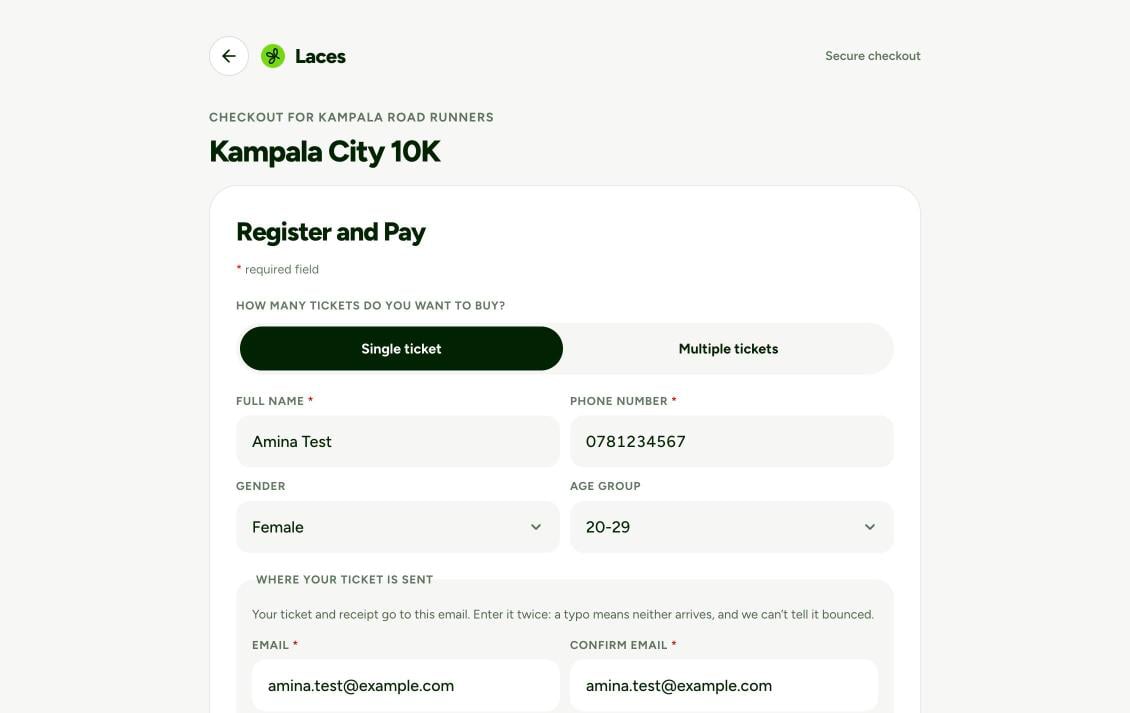
Open `data.url` in your browser, register with your own details, and pay
with mobile money (or confirm, for a free ticket). Laces sends you back to
`https://shop.example.com/?session=LCSCS-…`.
* **Name**: "Quickstart".
* **Permissions**: leave the defaults (Read events, Create orders, Start
hosted checkout).
* **Return URL domains**: add your site's origin, for example
`https://shop.example.com`.
Tap **Create key**, then **Copy all**. The secret is shown once. In your
terminal:
```bash theme={null}
export LACES_BASE="https://connect.laces.run/v1"
export LACES_CLIENT_ID="LCSCLI-EXAMPLECLNT2345EXAMP"
export LACES_CLIENT_SECRET="LCSSECK-EXAMPLESECRET2345678EXAMPLESECRET2345678EXAMPLESECRE-X"
export LACES_PK="LCSPUBK-ABCDEFGHJKLMNPQRSTUVWXYZ23456789-X"
```
Details: [Getting your API keys](/api-keys).
```bash theme={null}
curl -s -X POST "$LACES_BASE/oauth/token" \
-u "$LACES_CLIENT_ID:$LACES_CLIENT_SECRET" \
-d "grant_type=client_credentials"
```
```json theme={null}
{
"access_token": "LCSTOK-EXAMPLETKN23456789EXAMPLETKN23456789EXAMPLETKN234567-X",
"token_type": "Bearer",
"expires_in": 3600,
"scope": "events:read orders:write checkout_sessions:write"
}
```
```bash theme={null}
export TOKEN=""
```
A `401 invalid_client` means the id or secret is wrong (check for a missing
character or changed case). A `401 partner_credential_not_accepted` means
you called a host other than `connect.laces.run`. See
[Authentication](/authentication).
```bash theme={null}
curl -s "$LACES_BASE/events" -H "Authorization: Bearer $TOKEN"
```
```json theme={null}
{
"code": 200,
"message": "Events retrieved successfully",
"data": {
"events": [
{
"event_id": "q3Zk9mVx",
"name": "Quickstart test run",
"status": "open",
"visibility": "unlisted",
"starts_at": "2026-11-15T04:00:00.000Z",
"currency": "UGX",
"payments_enabled": true
}
],
"has_more": false
}
}
```
Copy your test event's `event_id`. Then look at its tickets and fees:
```bash theme={null}
curl -s "$LACES_BASE/events/q3Zk9mVx" -H "Authorization: Bearer $TOKEN"
```
An empty list means your organization has no event that is open or
scheduled, public or unlisted, and not yet ended.
`payments_enabled: false` means your organization isn't cleared to take
payments yet, so checkout will be refused with `payments_disabled`.
Create a hosted checkout session. Your server would make this call; here
it's curl:
```bash theme={null}
curl -s -X POST "$LACES_BASE/checkout-sessions" \
-H "Authorization: Bearer $TOKEN" \
-H "Content-Type: application/json" \
-d '{
"event_id": "q3Zk9mVx",
"on_success_url": "https://shop.example.com/?session={CHECKOUT_SESSION_ID}",
"on_cancel_url": "https://shop.example.com/"
}'
```
```json theme={null}
{
"code": 201,
"message": "Checkout session created successfully",
"data": {
"id": "LCSCS-EXAMPLESESSN234EXAMPL",
"url": "https://laces.run/checkout/LCSCS-EXAMPLESESSN234EXAMPL",
"expires_at": "2026-11-02T09:30:00.000Z",
"ui_mode": "redirect"
}
}
```
Open `data.url` in your browser, register with your own details, and pay
with mobile money (or confirm, for a free ticket). Laces sends you back to
`https://shop.example.com/?session=LCSCS-…`.
 `400 invalid_return_url`? The URL's origin isn't in **Return URL domains**
exactly as typed (scheme, host and port).
Your server confirms the result. Here it's curl:
```bash theme={null}
curl -s "$LACES_BASE/checkout-sessions/LCSCS-EXAMPLESESSN234EXAMPL" \
-H "Authorization: Bearer $TOKEN"
```
```json theme={null}
{
"code": 200,
"message": "Checkout session retrieved successfully",
"data": {
"id": "LCSCS-EXAMPLESESSN234EXAMPL",
"status": "complete",
"ui_mode": "redirect",
"event_id": "q3Zk9mVx",
"client_reference_id": null,
"order": { "id": "Hk2mQ8vR", "code": "LC-7K2M9X", "status": "paid", "total": 52400, "currency": "UGX" }
}
}
```
`status: "complete"` with `order.status: "paid"` means the registration is
paid. That's a working checkout. If you paid for it, refund it from the
Laces app.
**Never fulfil an order on the browser's word alone.** A redirect to your
success page, or an `onSuccess` callback in the page, is user experience,
not proof of payment. Anyone can type your success URL. Before you mark
anything paid, confirm it on your **server**: read the session with
[`GET /checkout-sessions/{id}`](/api-reference/v1/checkout-sessions/get)
and require `status: "complete"`, or act on a signed
[`order.paid` webhook](/guides/webhooks).
## Next steps
A Register button on your page, return URLs, `client_reference_id` and errors.
Get `order.paid` pushed to your server instead of asking.
The same checkout in a modal on your page, with `laces.js`.
Your own checkout form, with native mobile money.
This documentation is built and hosted on [Mintlify](https://mintlify.com), a developer documentation platform.
`400 invalid_return_url`? The URL's origin isn't in **Return URL domains**
exactly as typed (scheme, host and port).
Your server confirms the result. Here it's curl:
```bash theme={null}
curl -s "$LACES_BASE/checkout-sessions/LCSCS-EXAMPLESESSN234EXAMPL" \
-H "Authorization: Bearer $TOKEN"
```
```json theme={null}
{
"code": 200,
"message": "Checkout session retrieved successfully",
"data": {
"id": "LCSCS-EXAMPLESESSN234EXAMPL",
"status": "complete",
"ui_mode": "redirect",
"event_id": "q3Zk9mVx",
"client_reference_id": null,
"order": { "id": "Hk2mQ8vR", "code": "LC-7K2M9X", "status": "paid", "total": 52400, "currency": "UGX" }
}
}
```
`status: "complete"` with `order.status: "paid"` means the registration is
paid. That's a working checkout. If you paid for it, refund it from the
Laces app.
**Never fulfil an order on the browser's word alone.** A redirect to your
success page, or an `onSuccess` callback in the page, is user experience,
not proof of payment. Anyone can type your success URL. Before you mark
anything paid, confirm it on your **server**: read the session with
[`GET /checkout-sessions/{id}`](/api-reference/v1/checkout-sessions/get)
and require `status: "complete"`, or act on a signed
[`order.paid` webhook](/guides/webhooks).
## Next steps
A Register button on your page, return URLs, `client_reference_id` and errors.
Get `order.paid` pushed to your server instead of asking.
The same checkout in a modal on your page, with `laces.js`.
Your own checkout form, with native mobile money.
This documentation is built and hosted on [Mintlify](https://mintlify.com), a developer documentation platform.